• Home
  • Suggest A DIY
  • DIY Newsletter

Scrap Booking

Themes, layouts and inspirations

  • About CraftGossip
  • Our Network
    • Bath & Body Crafts
    • Candle Making Ideas
    • Crochet Ideas
    • Cross Stitch
    • Edible Crafts
    • Felting Patterns
    • Glass Art
    • Home & Garden Ideas
    • Indie Crafts
    • Jewelry Making
    • Kids Crafts
    • Knitting Patterns
    • Lesson Plans
    • Needlework
    • Party Ideas
    • Polymer Clay
    • Quilting Ideas
    • Recycled Crafts
    • Scrapbooking
    • Sewing Patterns
    • Card Making
    • DIY Weddings
    • Not Craft Ideas
  • Giveaways
  • Roundups
  • Store
  • Search

Win a copy of Corel Painter Essentials

January 21, 2009 by Francine Clouden

Robert MacDonald, Product Manager for CorelR Painter(TM) and CorelR Painter(TM) Essentials, will lead a session on hybrid scrapbooking at the Craft & Hobbyist Association (CHA) Winter 2009 Convention and Trade Show, in Anaheim, CA. The session, entitled “The Best of Both Worlds: A Step-by-Step Guide to Introduce Hybrid Scrapbooking inYour Store,” will take place on Monday January 26, 2009 at 12 p.m. in Room 205AB of the Anaheim Convention Center in Anaheim, CA.

Corel’s CHA session will provide retailers with creative, constructive examples of how they can effectively combine elements of traditional and digital scrapbooking to provide more creative
opportunities  to their customers and grow their businesses.

About the software:

Based on Corel Painter, the world’s most powerful Natural-MediaR painting
and illustration software, Corel Painter Essentials includes everything new
users need to set up their own home art studio. Featuring a wide selection
of paint brushes, pencils, paper textures and built-in tutorials, Painter
Essentials 4 is the perfect program to help users get started with digital
art and create stunning paintings – either from existing photos or from
scratch.

For more information on Corel Painter Essentials or to download a fully-functional trial version, please visit www.corel.com/painteressentials. For more information about CHA Winter 2009, visit www.chashow.org.

And you have a chance to win a copy of this software! Corel has kindly provided us with a copy for one of our readers. Here’s how you can enter the random draw

  1. Leave a comment telling us about your experiences with Hybrid Srapbooking and/or Corel software
  2. For a second entry post about this giveaway linking back to us, on your blog or favourite message board and leave another comment with a link to where you posted.
  3. For a third entry post about this on Twitter or Facebook and leave a comment with a link to your profile on either of those websites.

So spread the word to all your digital and hybrid scrapbooking friends! Remember to include an email address when you comment so that we will be able to contact you if you are the lucky winner! You have until January 27th at midnight EST to enter the drawing.

[tags]cha, corel painter essentials, giveaway, hybrid scrapbooking[/tags]
«
»

Comments

  1. Katherine McKamey says

    January 21, 2009 at 8:57 am

    WOW! I would love to win CPE! Would love to attend CHA and see everything in person too…: )

  2. Katherine McKamey says

    January 21, 2009 at 8:58 am

    Here is my blog addy so you can see I blogged about this give away…

    http://csmoferret.blogspot.com/

    Thanks for the opportunity!!

  3. Katherine McKamey says

    January 21, 2009 at 8:59 am

    Oops – here is the email address I forgot to add to one of the 2 previous comments. [email protected]

    Thanks again!

  4. Annette says

    January 21, 2009 at 8:18 pm

    I have used the older PSP by Corel versions and LOVED it. The Corel software is easy to use and offers plenty of cool options!

  5. Melinda Wilson says

    January 27, 2009 at 7:53 am

    I have completed some journaling and copied some clipart but that is all so far.

  6. Teresa Novak says

    January 27, 2009 at 8:14 am

    I really don’t have any experience with Corel software, but this product sounds great. I would love to try it.

  7. Jodi says

    January 28, 2009 at 2:40 am

    My only experience with anything Corel is PSP 7 and 9. I love my PSP and know I would probably love owning this one too! Thanks for the chance!

  8. Jodi says

    January 28, 2009 at 2:43 am

    I left a comment on my twitter and a link! thank you. :o)
    http://twitter.com/JodiofTSSA

  9. brenda says

    January 28, 2009 at 5:24 pm

    I was just shopping for software today.

  10. Linda Hofacker says

    January 30, 2009 at 11:42 am

    I was determined to learn digital scrapping – even bought myself an Epson 1800 Wide Format Printer – I just couldn’t figure out the Elements without pulling my hair out to get it right. My oldest daughter knows Corel and I’m hoping if I win this she will be kind to her old Mom and show me the way! 🙂

Trackbacks

  1. Giveaway deadline extended. · Scrapbooking @ CraftGossip says:
    January 27, 2009 at 5:32 am

    […] extending the deadline for the Corel Painter Essentials Giveaway until Friday January 30th midnight EST. That should give everyone enough time to get their comment […]

  2. Giveaway Reminder · Scrapbooking @ CraftGossip says:
    January 30, 2009 at 3:41 am

    […] New Year!!!Free online class from ShimelleSome more giveawaysCreate a scrapbook while hikingWin a copy of Corel Painter EssentialsJillibean Soup GiveawayOnline Scrapbooking ClassesValentine Download from Valerie SalmonCHA Sneak […]

Have you read?

10 Colorful Halloween Scrapbook Layout Ideas

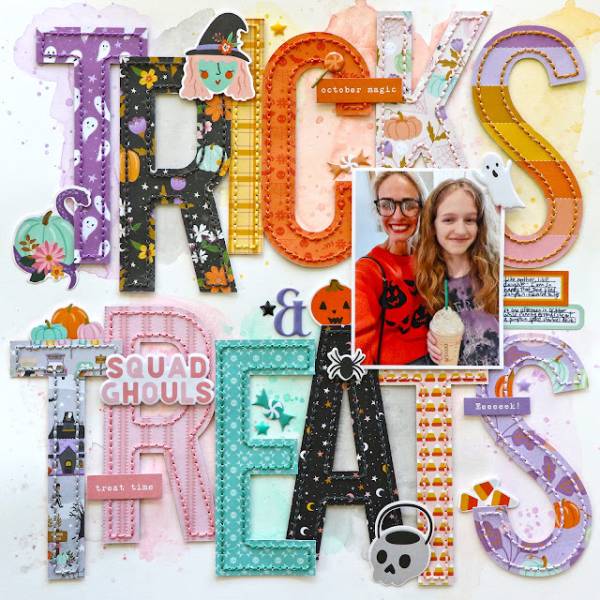
Paige filled her page with one of her own die cut title designs that says “Tricks and Treats”. The letters are cut from all different types of Fall and Halloween pattern papers and stitched around the edge of each one in coordinating thread colors. Her photo and some puffy stickers over lay some letters, there’s a couple of small tags for journaling and a light watercolor wash for the background too. Learn more at the Paige Evans blog.

Halloween is almost here and I hope you’re ready with your house decorated to greet all the trick or treaters, a trip to the pumpkin patch to pick and carve into the perfect Jack o’ Lantern, bought all the candy for trunk or treat and tried on all the costumes to find one that’s just right. I know you snapped lots of pic while getting ready for Halloween and will do on the big day too so let’s create some fun and colorful scrapbook layouts to remember all those spooky and silly Halloween traditions, here’s some amazing inspiration to get you started.

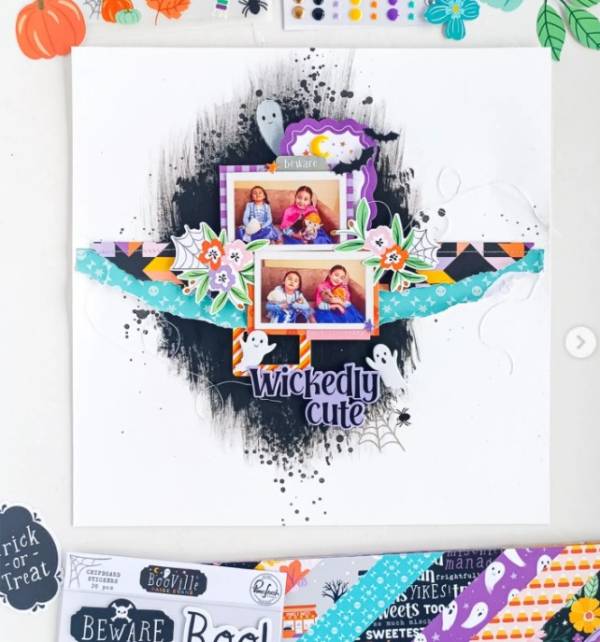
Nathalie created a dark black spooky splotch with ink streaks and splatter to offset all the color on her sweet Halloween layout. There’s a border of stitched and torn pattern paper across the center with matted photos, spider webs, florals, ghosts and webs with a cute sentiment below the border. I spotted her idea on her Tachita 55 Instagram page.

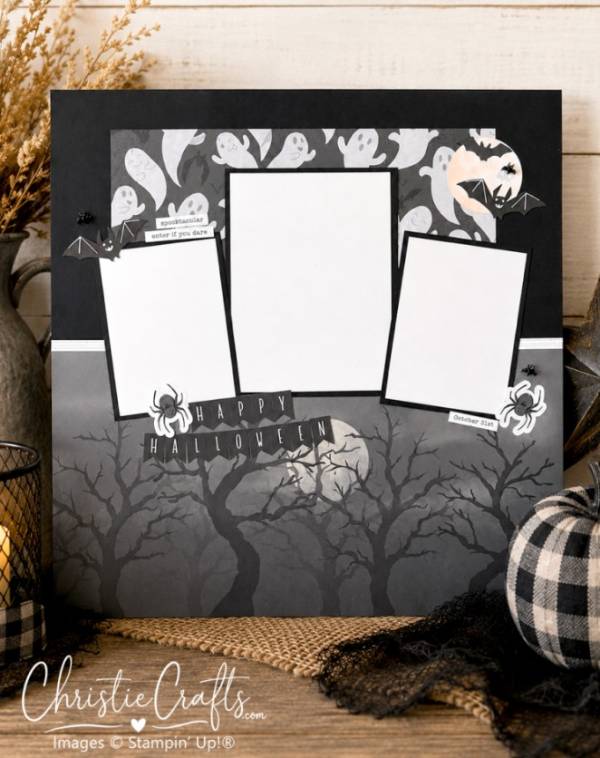
Christie created a simple but effective background with two Halloween pattern papers, one has spooky trees across the bottom and the other has happy ghosts matted on black with a white ribbon between the two. She also designed a fun banner with pennant letters and added a few bats and spiders. I know this isn’t a colorful layout but black and white pages like this are perfect for photos with loads of color to make them pop! Find all the details at the Christie Crafts blog.

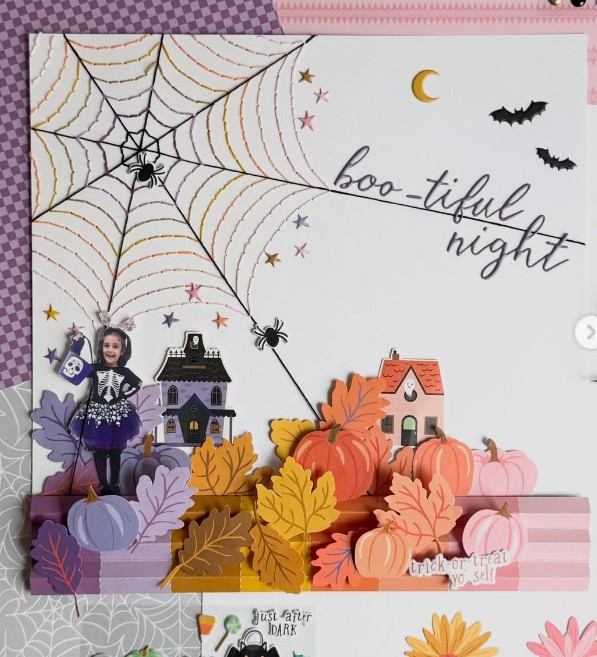
Camino’s darling design uses a fussy cut photo, which is a fun way to incorporate a picture into a scene, with haunted houses, a colorful striped border and piles of pumpkins and leaves in coordinating colors to the border. But the star of the show is the stitched spider web in the same matching colors with tiny spiders crawling on it. I came across her idea on her Camino Garcia Instagram.

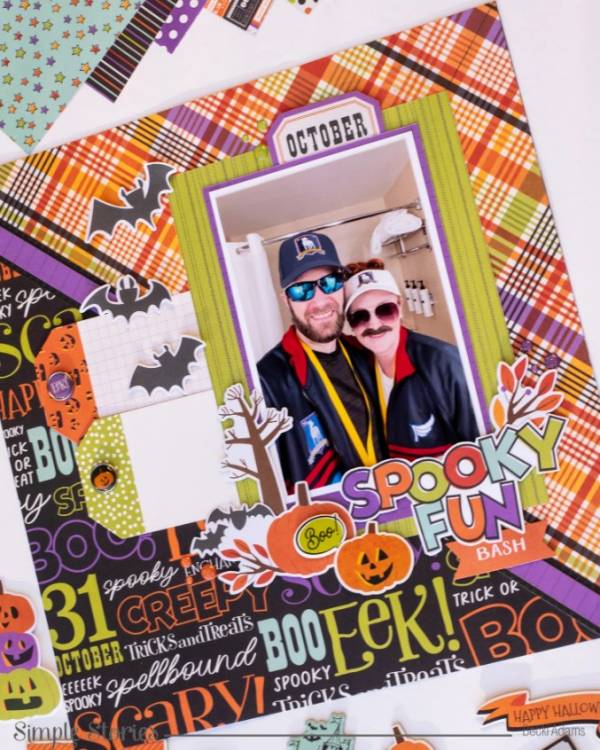
Becki created a dynamic background with colorful Halloween pattern paper cut at an diagonal for the background, adding a few thin strips to separate them. Behind her photos are two tags with enamel buttons, perfect for journaling, a flutter of bats and cluster of accents around the chipboard title. Find out more at the Simple Stories blog.

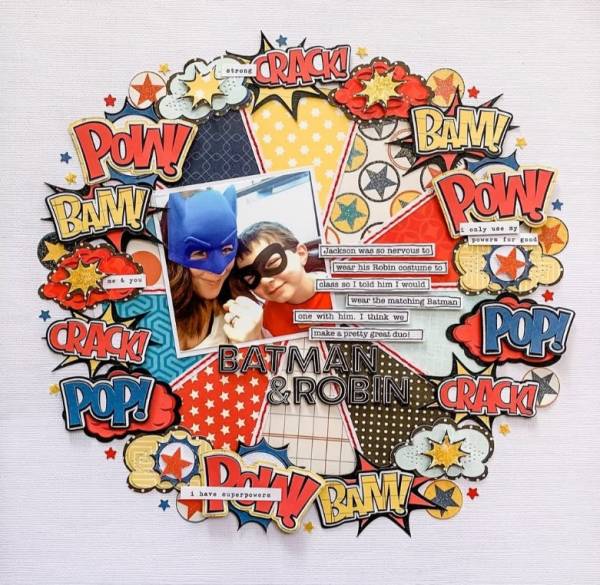
Allison’s stunning super hero layout has a pie chart center made of stitched pattern paper triangles and an amazing circle of die cut and fussy cut clouds and action words. The center photo is slightly tilted with journaling strips beside it and a fun custom black title. I spotted this idea on the Scrapbook Generation Instagram page.

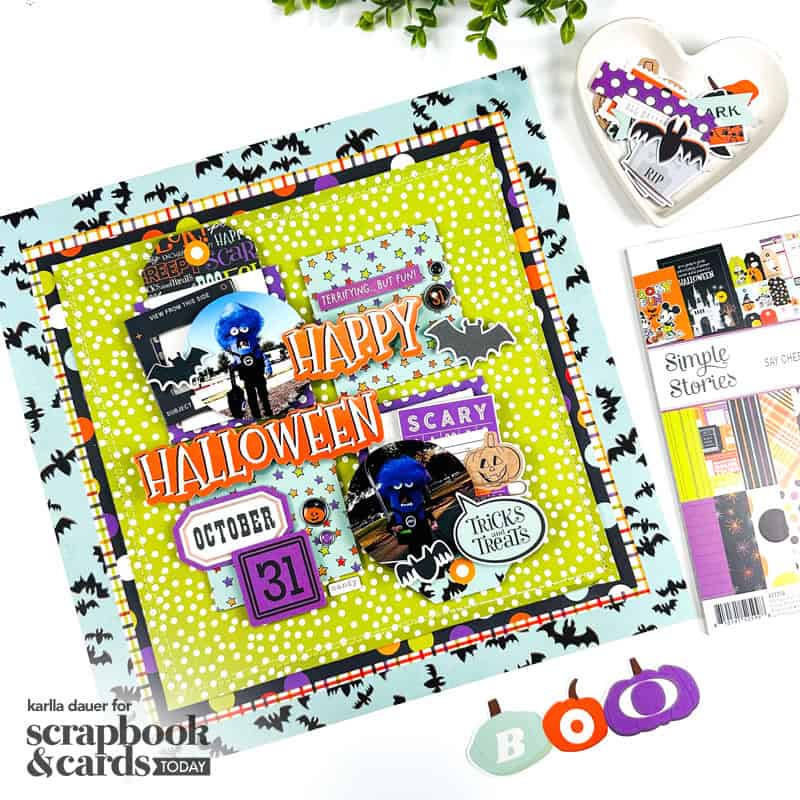
Karlla used a whopping 4 different layers of pattern paper for the background of her colorful layout, the top one also has stitching. The main design is a grid with 4 squares, two with tags and the photos layered over, the others have Halloween pattern paper with buttons, labels and sentiments with a title overlapping the grid. Find a link to her process video at the Scrapbook and Cards Today blog.

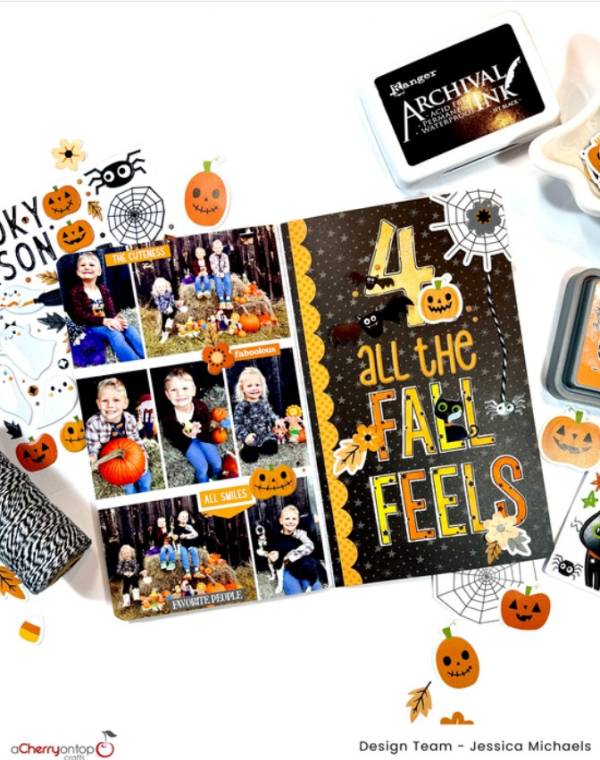
Jessica adjusted a sketch as the jumping off point for a double page spread in her Traveler’s Notebook. One side is filled with pumpkin patch photos with small stickers and sentiments, the other side is a custom mixed title made with puffy, die cut and stamped letters with cute critters tucked in and a scalloped edge. Find all the details at A Cherry on Top blog.

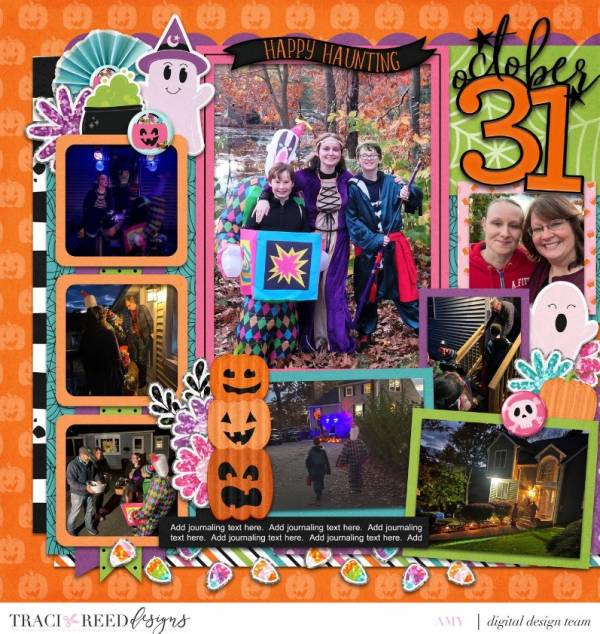
Amy’s fun digital design uses lots of frames and matts in bold colors around all the photos, of which there are 8! But there’s still room for a patterned background, brightly colored embellishments and some sentiments too. This is a great way to bring color to darker photos! She breaks it all down at the Traci Reed Designs blog.

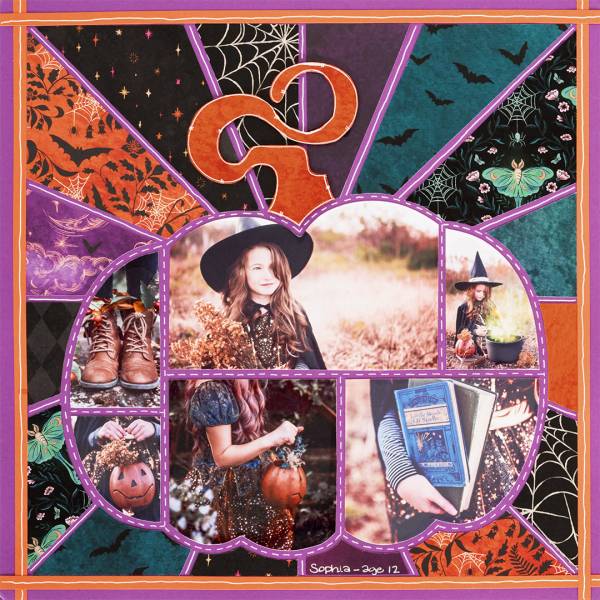
Melissa used a couple of templates for her Halloween page with a star burst design background filled with different pattern papers and a pumpkin template with open sections that she filled with photos. The templates were cut out from purple cardstock with faux stitching added and there’s also thin orange borders at the edges as well. Find directions at the Creative Memories blog.

I hope you have a fun and colorful Halloween!

-Heather

Looking for scrapbook supplies, we recommend A Cherry on Top.com


Explore

backgrounds Christmas Crafts Design Theory die cutting embellishments family Freebies Free Printables Holidays Inspiration - Layout Ideas Journaling News Paper Crafts Scrapbooking Themes Scrapbook Titles Techniques Tips and Tricks Tutorials Tutorials & Ideas

RSS feed: More Articles More Articles

  • Designer Spotlight: Stitching Housewives
  • Easy Projects to Knit with a Square (or Two)
  • 10 Colorful Halloween Scrapbook Layout Ideas
  • Ghost Poop Marshmallow Bags With a Free Printable Halloween Topper
  • Knit Picks Friends & Family Sale: Save 20% on Your Next Knitting Project
  • Easy Cosmetics Bag Sewing Pattern
  • Domestic vs Imported Wool – Does Origin Matter in Felting?
  • 10 DIY Christmas Earrings To Make For The Holiday Season
  • 10 Temari Ball Instructions for Learning This Beautiful Japanese Needle Art
  • Celebrating Guy Fawkes Night with Kids

Copyright © 2026 · CraftGossip | Start Here | Contact Us | Link to Us | Your Editors | Privacy and affiliate policy