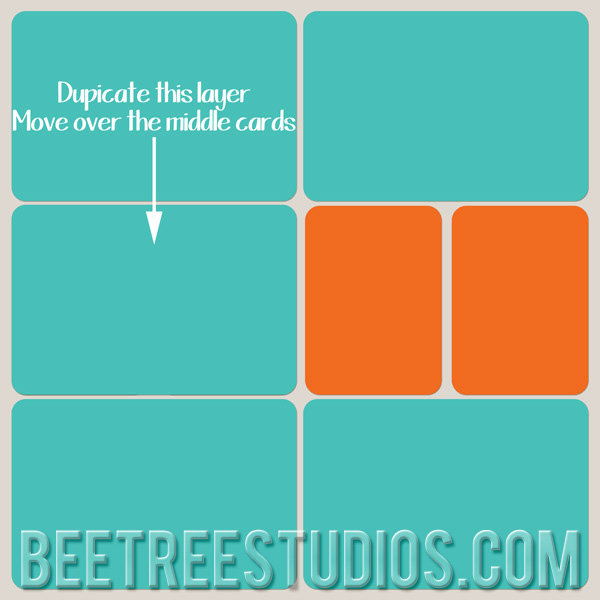
Stephanie from Bee Tree Studios, shows how you can increase the size of photos spots in digital project Life templates. This could come in handy if you want to include a photo that won’t fit in a 4×6 spot. She outlines three different methods you can use to do this. Click here to go to the tutorial.
Comments
Trackbacks
[…] Tutorial | Make Larger Photo Spots in Digital Project Life Templates – 1 freebie(s)? […]
Have you read?
Crafty Themed Mini Scrapbook Album
Niella used the Color Me Crafty collection from Doodlebug to create this adorable crafty themed mini album. The cover and each page are shaped like giant tickets and there’s a disc binding on the edges and fun dangling charm hanging on the spine. The cover has a cute stack of Polaroids accent and a layered scalloped border with button pattern paper.
Inside she used more crafty pattern papers, embellishments, stickers, cardstock, puffy words and more to designs wonderful pages that have lots of room for crafty photos and journaling.
There’s even a pocket to tuck in mementos and ephemera. I love the color scheme of this collection, it’s so bright and cheerful! This little album project is perfect for all your memories of going to scrapbooking classes, crops, conventions, retreats, hanging out crafting with friends or pics of your craft room.
Visit the Doodlebug blog to learn more about this project and watch a flip through video.
-Heather


Hi Stephanie. I went over and checked out the tutorial. I think I have a lot to learn about the basics that you mentioned before I am ready for this. But I am cataloging it all so that when I am ready, I will know just where to go for my tutorials.
Regina, I’m currently working on a Project Life “basics” series. I will have some information posted next week so make sure to stop by =)