• Home
  • Suggest A DIY
  • DIY Newsletter

Scrap Booking

Themes, layouts and inspirations

  • About CraftGossip
  • Our Network
    • Bath & Body Crafts
    • Candle Making Ideas
    • Crochet Ideas
    • Cross Stitch
    • Edible Crafts
    • Felting Patterns
    • Glass Art
    • Home & Garden Ideas
    • Indie Crafts
    • Jewelry Making
    • Kids Crafts
    • Knitting Patterns
    • Lesson Plans
    • Needlework
    • Party Ideas
    • Polymer Clay
    • Quilting Ideas
    • Recycled Crafts
    • Scrapbooking
    • Sewing Patterns
    • Card Making
    • DIY Weddings
    • Not Craft Ideas
  • Giveaways
  • Roundups
  • Store
  • Search

New Free Layout-a-Day iPhone App from Lain Ehmann & an Interview!

February 1, 2013 by Francine Clouden

LOAD iPhone App by Lain Ehmann
Lain Ehmann from Layout a Day – the site that helps you pump up your scrapbooking by making a page a day for a month – has just released a free iPhone app of the same name.  It’s touted as the only app that actually inspires scrapbookers — digi, paper, or hybrid — to capture their stories. Scrapbookers can use it to for personal challenges, for scrapping with a friend, or just to jumpstart their creativity and get past the dreaded blank page “scrapper’s block.”
I asked Lain to share some more information about this new app:
“How is the Layout a Day app different from the other apps in the iPhone app store?”

There are currently only 75 scrapbooking-related apps in the Apple App Store.

36 are paid, between $.99 and $10.99 for download. The Layout a Day App is FREE!

17 are digital scrapbooking apps that allow you to create pages on your phone. The Layout a Day App is all about inspiration and works for paper, hybrid, or digi scrappers!

11 are photo/video editors that allow you to add effects to your photos on your phone. The Layout a Day App helps you scrapbook your photos the way YOU want!

The remaining apps are ebooks, magazines, blog news feeds, and stash inventory tracking… all useful, but WHERE IS THE INSPIRATION? Oh, it’s right here.

“How does it work?”
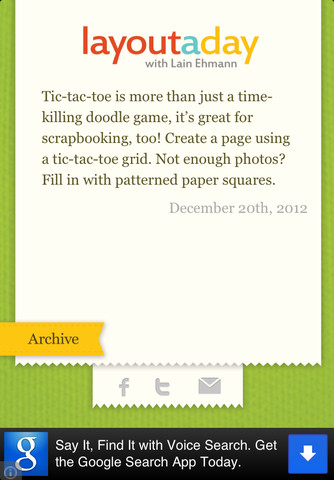
You download the FREE app from the Apple App Store. Each and every day of the year you’re served up a short tidbit of inspiration: A photography challenge, a design idea, a page topic. Then you use that as a springboard to create the pages you want to document the stories you have to tell!
You can then post the prompt to Facebook or Twitter, or email to a friend. And you can go back and look at previous days’ prompts using the archive feature.
“How can I use this?”

-As a jumpstart for your “scrap-blocked” moments when you want to create but you just don’t know where to start.

-As a timed challenge for yourself. Set your timer to 30 minutes and see what you can do!

-As a group challenge – get together with some friends near or far and commit to creating a page a day for a week, or on the first of the month, or whatever. Upload your creations to your Facebook page and keep up on what you’re doing!

-As your own personal “Layout a Day” (LOAD) challenge. We’re doing a group challenge in February (and again in May!) but if you missed those, you can set yourself up for your own LOAD using these prompts. (NOTE: The LOAD challenges in Feb. and May include many other features, such as themes, message boards, daily videos, daily sample layouts, and more. The prompts served up through the free Layout a Day App are NOT the same ones used during the monthly LOAD challenges.)

-As a way to recruit your non-scrapping friends. You can send them the daily prompt and say, “Wanna do this with me? Hunh? Hunh? Hunh?” When they see the cool things you create, they’ll be on their way to Archiver’s in no time!

“Sounds cool. Where do I get it?”
You can download the Layout a Day iPhone App for free here: http://www.lainloves.com/LOADapp

“Will it work on an iPad?”

Yes. It works on the iPad, iPad Mini, the iPhone, and the iTouch.

“What about an Android app?”

I’m looking into it! It will depend on how much it costs to convert from iPhone to Android. Stay tuned!

As an Android user myself I am especially interested in that last bit! This app looks great and definitely seems like one I would use.

What do you think?

«
»

Comments

  1. Haley D. says

    February 2, 2013 at 6:44 am

    Very cool! I am adding this to my iPad now. Thanks!

Trackbacks

  1. CraftCrave | Blog | Textual List: Saturday, 02 Feb 2013 says:
    February 1, 2013 at 4:00 pm

    […] New Free Layout-a-Day iPhone App from Lain Ehmann & an Interview! – 1 freebie(s)? […]

  2. CraftCrave | Blog | Free Handcraft Items or Tutorials (large): Saturday, 02 Feb 2013 says:
    February 1, 2013 at 4:01 pm

    […] New Free Layout-a-Day iPhone App from Lain Ehmann & an Interview! – 1 freebie(s)? […]

Have you read?

Crafty Themed Mini Scrapbook Album

Freebie Friday – Printable Buttons and Ribbons For Junk Journals

FREE “Make all the Things” SVG Cut File

12 Scrapbookers You Should be Following on Instagram (where are all the blogs? pt. 2)

FREE Layered Citrus Wreath SVG Cut Files

Explore

backgrounds Christmas Crafts Design Theory die cutting embellishments family Freebies Free Printables Holidays Inspiration - Layout Ideas Journaling News Paper Crafts Scrapbooking Themes Scrapbook Titles Techniques Tips and Tricks Tutorials Tutorials & Ideas

RSS More Articles

  • Cute Little Backpack Knitting Patterns
  • Easy Pen and Paper Games for Road Trips and Beyond
  • Handmade Pretend Play Food Ideas For Kids’ Kitchens, Classrooms And Crafty Grandparents
  • Air-Dry Clay Sunflower Trinket Dish Tutorial
  • Beginner-Friendly Crochet Scarves and Cowls
  • Satisfying Adult Snacks That Crush Cravings and Boost Energy
  • 30 Jumpsuits You Can Sew Yourself – From Effortless Weekend Wear to Showstopping Styles
  • You Won’t Believe These 20 Upcycled Bar Tables and Carts – From Trash to Tipsy
  • Young Lady in a Hammock Hand Embroidery Pattern – Etsy Review
  • Crafty Themed Mini Scrapbook Album

Copyright © 2026 · CraftGossip | Start Here | Contact Us | Link to Us | Your Editors | Privacy and affiliate policy