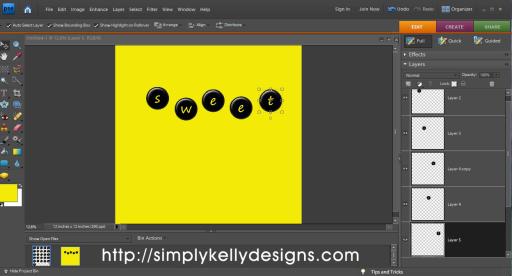
Kelly from Simply Kelly Designs shares this video tutorial showing how to best use alphabet and other sticker sheets in Adobe Photoshop Elements 7. She explains that she finds it simpler to use the sheets than individual sticker PNGs. Click here to go to the tutorial.
Trackbacks
Have you read?
How to Make a Back to School Shaker Scrapbook Layout
How fabulous is this Back to School layout from Margie!? Using soft pastel pattern papers with basic shapes on them she has a double layered background but the star of the show is the large shaker element surrounded by colored pencils. She fussy cut rows of the pencils from pattern paper, curving and slightly overlapping them to form the outer circle. Inside is a circle of thin foam tape for the edges of the shaker, filled with lots of small buttons and covered with clear acetate. She backed the photo with more pattern paper, cutting a zig zag edge and used die cut letters and printed circles for the title.
Find her step by step directions at the Scrapbook Adhesives by 3L blog.
-Heather
Looking for Back To School papers, stamps, and embellishments? Check out these Back to School-themed supplies we found.


[…] Video Tutorial | Using an Alphabet Sheet in Photoshop Elements 7 – 1 freebie(s)? […]