• Home
  • Suggest A DIY
  • DIY Newsletter

Scrap Booking

Themes, layouts and inspirations

  • About CraftGossip
  • Our Network
    • Bath & Body Crafts
    • Candle Making Ideas
    • Crochet Ideas
    • Cross Stitch
    • Edible Crafts
    • Felting Patterns
    • Glass Art
    • Home & Garden Ideas
    • Indie Crafts
    • Jewelry Making
    • Kids Crafts
    • Knitting Patterns
    • Lesson Plans
    • Needlework
    • Party Ideas
    • Polymer Clay
    • Quilting Ideas
    • Recycled Crafts
    • Scrapbooking
    • Sewing Patterns
    • Card Making
    • DIY Weddings
    • Not Craft Ideas
  • Giveaways
  • Roundups
  • Store
  • Search

New Online Photo Editor

August 29, 2009 by Francine Clouden

index-mixed2

Rollip is a new site offering a simple online photo editing tool. You can convert your photo in a variety of ways and do so in two formats, either Polaroid, or regular size. The effects include various sepia tones, soft focus, and neon effect.  Using the site is simple, just click on the image of the effect you want, and follow the instructions to upload your photo.

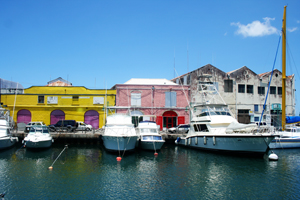
I tried out the editor on this photo
IMG_6501

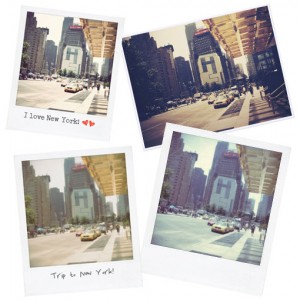
And converted it to a  Polaroid as well as gave it a vintage look as you can see at left.
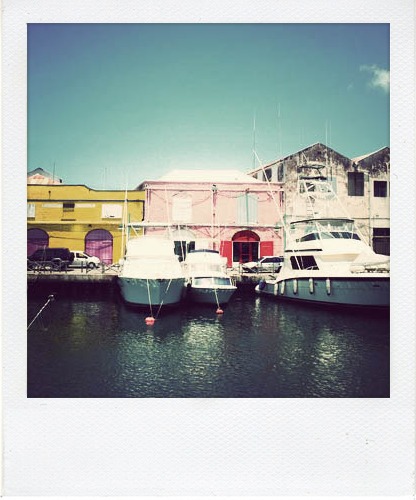
rollipimage1

rollipimage2

If you choose to make your photo into a Polaroid, you also have the option of adding text or decorations to the edges of the image as shown
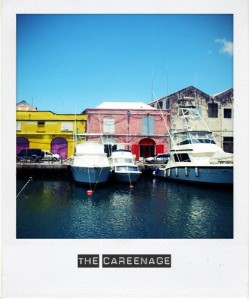
rollipimage4

Once the transformation is complete you have the following options

1. Download your photo

2. Share a direct link in email, on a website or in instant messaging

3. Share the photo in e-mail, on Facebook, MySpace or a variety of other social media websites

If you use Flickr, you can also share your Rollip creations in the Rollip group.

I quite like this site and can see myself converting a variety of photos. it’s simple and quick. My main reservation is with regards to the file sizes of the converted photos which are quite small (less than 100K in some cases, and only 400 pixels wide). I haven’t had a chance to print them out to see the quality, but according to the site you should be able to print the photos out.

I also would like it if the different conversions were given names, so that it would be easier to distinguish between them. Also suggestions as to what kind of photos work well with each conversion would be useful. But with a little time and trial and error I think that anyone can get neat effects on their favourite photos!
Click here to go to Rollip to try it out!

«
»

Have you read?

4 Crayon Cutable or Printable Files for Back to School

4 Crayon Cutable or Printable Files for Back to School

These 4 adorable, colorful Crayons are perfect for back to school crafting, create scrapbook layout for that first day, cards for new teachers or notes to tuck inside kids lunch boxes. There’s 4 different colors of Crayon, pink, blue, orange and green, each with a cute smiley face and feet. This group comes in SVG, PNG, DXF and EPS file types so you can die cut them with your electronic die cutting machine in any color you’d like or print them out to use and best of all they are FREE to download!

Click here to visit Caluya Designs to get them.

-Heather

Looking for Back To School papers, stamps, and embellishments? Check out these Back to School-themed supplies we found.


Explore

backgrounds Christmas Crafts Design Theory die cutting embellishments family Freebies Free Printables Holidays Inspiration - Layout Ideas Journaling News Paper Crafts Scrapbooking Themes Scrapbook Titles Techniques Tips and Tricks Tutorials Tutorials & Ideas

RSS More Articles

  • 4 Crayon Cutable or Printable Files for Back to School
  • How to Make a Crochet Vision Board – Plan the Crochet Projects You Actually Want to Make
  • What to Serve with Rotisserie Chicken: 21 Delicious Sides You’ll Want on Repeat
  • Etsy Feature – Moth Pottery Template for Slab Building
  • Hubcap Creatures: Transforming Roadside Finds into Sculptural Wildlife
  • Learning about Georgia for Kids
  • How to Make a Moth Birthday Card
  • DIY Giant Eyeball Lanterns – Creepy Halloween Decoration
  • Designer Spotlight: Artmishka Cross Stitch
  • Freebie Friday – Grungy Pumpkins and Fall Tags Junk Journal Printables

Copyright © 2026 · CraftGossip | Start Here | Contact Us | Link to Us | Your Editors | Privacy and affiliate policy